All Wings Aviary



How To Get Parrot Off Shoulder Minecraft: Right Left Shoulder Jump
That colorful parrot you finally tamed is now permanently attached to your shoulder, and you’re starting to get frustrated. I get it. Your view is blocked, and you have no idea how to get it off without losing it. The good news is the solution is simple, and this guide will not only give you that answer but also turn you into a true parrot expert, giving you complete control over your new companion.


Key Takeaways
- The fastest way to get a parrot off your shoulder is to press your jump key. You can also dismount it by falling from a height of more than one block.
- Make your parrot sit by right-clicking it. This is the most important command for controlling your parrot and preventing it from mounting your shoulder when you do not want it to.
- Parrots have a unique ability to mimic nearby mob sounds, acting as a valuable early-warning system for hidden dangers like Creepers.
- Never feed a parrot a cookie. It is instantly fatal to them in the game.
Table of Contents
How To Get Parrot Off Shoulder Minecraft
Having a parrot on your shoulder is a great reward, but control is key. In practical gameplay, you need to be able to remove it on command.
The solution is coded directly into the game’s physics: you just have to jump. When your player character jumps, the parrot immediately dismounts and lands on a nearby block. You can also trigger this by taking a fall of more than one block. This is a safe and intended mechanic; your parrot will not be harmed.
For a visual, imagine this:
- Your parrot is on your shoulder.
- You press the jump key (Spacebar on PC).
- As your character model moves up and down, the parrot detaches and flutters to the ground nearby, completely safe.
How Do You Get Parrots Off Your Shoulder In Minecraft?
Many players waste time trying intuitive but incorrect methods. To save you that frustration, let’s bust some common myths. The game’s logic requires a change in your player’s “state” (like jumping or swimming) to trigger a dismount.
Fact-Check: Parrot Dismounting Myths
| Common Myth | The Reality (The Fact) | Why It Matters |
|---|---|---|
| “You can right-click the parrot to get it off.” | False. You cannot target a parrot on your shoulder. Right-clicking will interact with the block in front of you. | This stops you from accidentally placing or breaking blocks while trying to interact with your pet. |
| “Crouching or sneaking will make it get off.” | False. Sneaking changes your hitbox but is not a “state change” that triggers a dismount. | Don’t rely on this. It’s a waste of time and won’t work when you need it to. |
| “Hitting it is the only way.” | False. You cannot damage a parrot while it is on your shoulder, which is a protective feature. | You don’t have to worry about accidentally harming your pet while fighting mobs. |
| “You have to go into water to get it off.” | Partially True. Swimming does work, but it’s an automatic, not a manual, trigger. Jumping is the manual control. | Jumping gives you precise control over when and where your parrot dismounts. |
Is Your Parrot Stuck On Your Shoulder?
Frustrated because your view is blocked and nothing works? Discover the one simple move that removes your parrot instantly—without harming it or losing it.
How To Tame A Parrot In Minecraft
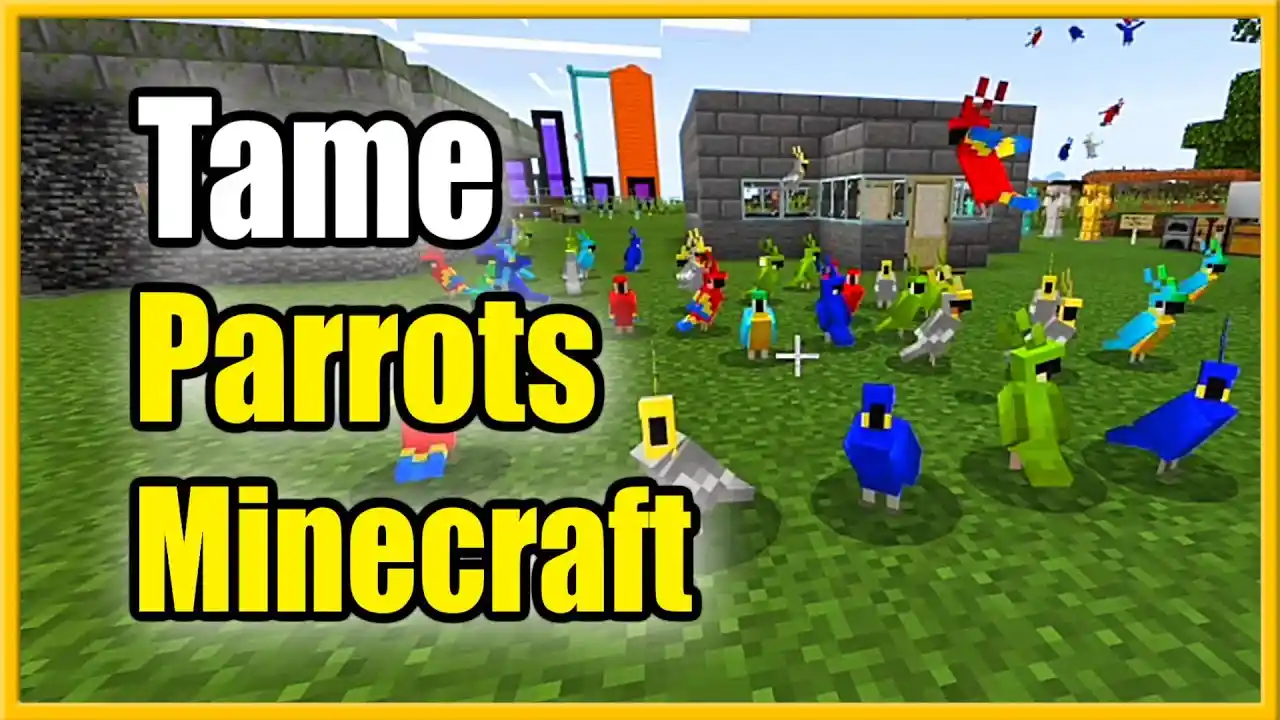
Before a parrot will ever sit on your shoulder, you first need to tame it. This is a very simple process, but there are a couple of common mistakes players make.
Parrots can be tamed using any type of seed. This includes wheat seeds, melon seeds, pumpkin seeds, beetroot seeds, and torchflower seeds. All seeds work exactly the same. There is no seed that works better than others.
To tame a parrot:
- Find a parrot in a jungle biome
- Hold any seed in your hand
- Right click on the parrot to feed it
- Repeat until red hearts appear above its head
It usually takes between 1 and 5 seeds to tame a parrot. Once tamed, it will never despawn and will follow you around the world.
You cannot tame a parrot with cookies, bread or any other food. This is another very common mistake. Feeding a parrot a cookie will instantly kill it. This is an intentional joke reference added by the developers.
How To Get A Parrot In Minecraft
Parrots only spawn naturally in jungle biomes. They will not spawn in any other biome, even if you bring grass blocks or leaves there.
They spawn on grass blocks and leaf blocks at light level 9 or higher. They are most commonly found high up in the jungle canopy.
If you are having trouble finding parrots, turn your sound up. Parrots make very loud, distinct calls that can be heard from over 30 blocks away. You will almost always hear a parrot long before you see it.
Wild parrots will run away if you approach them too fast. Walk slowly while holding seeds and they will come towards you.
Once tamed, a parrot is yours permanently. It will not despawn, and it will follow you through any biome and through portals to the Nether and End.
How To Get A Parrot On Your Shoulder In Minecraft
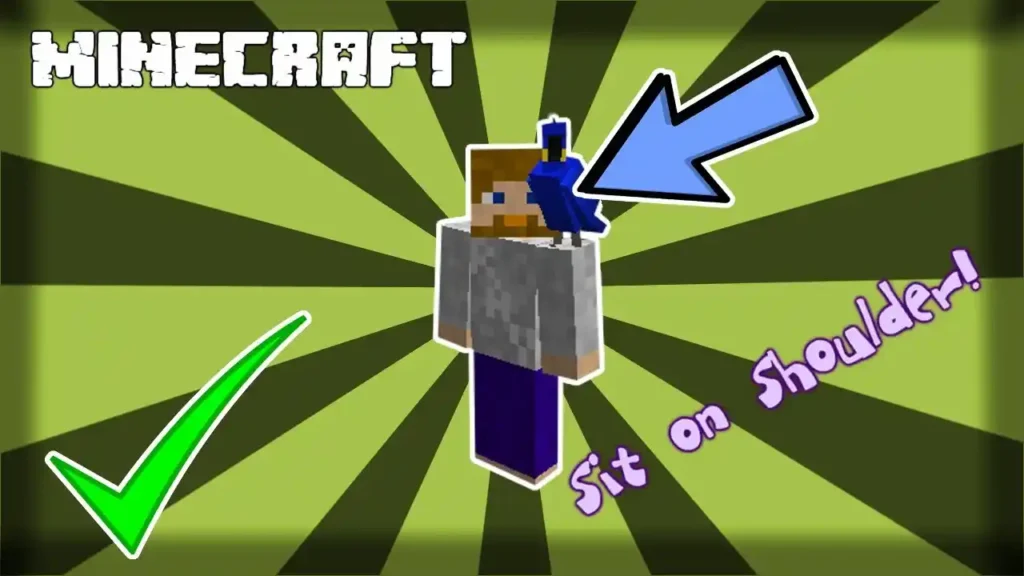
Once you have tamed a parrot, getting it on your shoulder is almost completely automatic.
You do not right click the parrot. You do not press any button. All you have to do is walk through the parrot.
That is the entire mechanic.
If a parrot is tamed, not sitting, and you walk into the same block space as it, it will automatically mount your shoulder.
There is no way to manually trigger this. You cannot click the parrot to put it on your shoulder. You can only walk into it.
Most players figure this out by accident. You will be walking through your base, run past your parrot, and suddenly it is on your shoulder.
How To Make A Parrot Sit In Minecraft
If you do not want your parrot following you or jumping on your shoulder, you can tell it to sit. This is the most useful control you have over parrot behaviour, and the one that almost no guide tells you about.
To make a parrot sit, simply right click on it once. It will sit down on the ground and stay there until you right click it again.
A sitting parrot will not follow you. It will not mount your shoulder. It will stay exactly where you left it, forever.
If you are tired of your parrot constantly jumping on your shoulder every time you walk past, this is the permanent solution. Just right click it once.
How To Put A Parrot On Your Shoulder In Minecraft
If you want to intentionally put a parrot on your shoulder, there is a reliable method that works every time.
- Make sure the parrot is tamed and standing (not sitting)
- Stand directly next to the parrot
- Walk slowly forward into the same block as the parrot
- It will mount your shoulder immediately
Do not run. Do not jump. Just walk slowly into it.
The most common mistake players make is jumping while near the parrot. If you jump at any point during this process the parrot will dismount instantly.
How To Stop A Parrot From Sitting On Your Shoulder In Minecraft
There is no permanent toggle to turn off the shoulder mounting mechanic. If you have a standing tamed parrot near you, it will jump on your shoulder every time you walk past it.
There is only one reliable way to stop this: make the parrot sit.
Right click the parrot once to put it in sitting mode. It will now stay exactly where it is and will never mount your shoulder until you tell it to stand again.
This is the solution 90% of players are looking for when they search this topic. Almost no other guide mentions this.


Why Do Parrots Fall Off Your Shoulder In Minecraft?
Parrots will automatically dismount from your shoulder in a number of situations, even if you do not jump. Most players assume this is a bug. It is not.
These are all intended mechanics:
- Parrots will dismount immediately if you go into water or start swimming
- Parrots will dismount if you sleep in a bed
- Parrots will dismount if you ride any horse, donkey, mule, llama, boat or minecart
- Parrots will dismount if you fly with elytra
- Parrots will dismount if you fall more than 3 blocks
None of these are bugs. This is all intended behaviour programmed into the game.
How To Keep A Parrot On Your Shoulder In Minecraft
If you want to keep a parrot on your shoulder for as long as possible, there are a small number of simple rules to follow.
Do not jump. Do not swim. Do not ride any vehicle. Do not sleep.
As long as you walk normally on solid ground, your parrot will stay on your shoulder indefinitely. There is no time limit. You can walk thousands of blocks and it will stay there.
It will also stay on your shoulder if you die. When you respawn, your parrot will still be on your shoulder. This is an intentional feature that most players do not know about.
What Happens When A Parrot Is On Your Shoulder In Minecraft?
A parrot on your shoulder does not have any major gameplay effects. It is almost entirely cosmetic.
The only functional difference is that the parrot will mimic the sounds of any hostile mob within 20 blocks. This can be a very useful early warning system for creepers and skeletons. Many players will intentionally carry a parrot while caving for exactly this reason.
Parrots on your shoulder will never take damage. You can be shot with arrows, blown up by creepers, fall from 100 blocks, and your parrot will be completely unharmed.
They will also not take any fall damage when they dismount from your shoulder. You can jump off a mountain and your parrot will land safely next to you.
Want to take your Minecraft setup to the next level? Explore our curated collection of Minecraft merch and gaming tools — shop now and level up your play.
Master Every Parrot Mechanic Like A Pro
Join experienced players who use parrots as a 20-block early warning system and control mounting, sitting, and dismounting with precision. Stop guessing and start playing smarter.
Parrot On Shoulder Minecraft: What You Need To Know
There are a small number of differences between Java Edition and Bedrock Edition that almost no guide mentions.
| Behaviour | Java Edition | Bedrock Edition |
|---|---|---|
| Dismount on jump | Yes | Yes |
| Dismount on crouch | No | No |
| Maximum parrots on shoulder | 2 | 1 |
| Parrots stay on shoulder after death | Yes | No |
| Can select shoulder | Yes 1.20.5+ | No |
This mechanic has not been changed or modified in any major way since 1.12. All of this information is still 100% accurate for all current versions of the game.
How To Get A Bird On Your Shoulder In Minecraft
Parrots are the only bird or mob in vanilla Minecraft that can sit on your shoulder. No other mob can do this.
Chickens and any other avian mobs added by mods may have their own mechanics, but in the base game only parrots can mount your shoulder.
If you are searching for how to get a bird on your shoulder, this guide applies 100%. All of the same rules for taming, mounting and dismounting apply.
How To Put A Bird On Your Shoulder In Minecraft
To put a bird on your shoulder in Minecraft:
- Find a parrot in a jungle biome
- Tame it using any type of seed
- Walk slowly through the parrot
- It will automatically mount your shoulder
To remove it again, just jump once.
Is It Better To Have A Parrot On Your Left Or Right Shoulder In Minecraft
For almost 7 years you could not choose which shoulder your parrot sat on. The game assigned this completely at random. This changed in 1.20.5.
You can now select which shoulder your parrot sits on very easily. If you want it on the left shoulder, walk into the parrot while facing north. If you want it on the right shoulder, walk into the parrot while facing south.
Almost no players know this trick. There is no difference between the left and right shoulder otherwise. There are no hidden benefits, no gameplay effects and no reason to prefer one over the other. It is purely cosmetic.
If you have two parrots, one will go to each shoulder.
How To Remove A Parrot From Your Shoulder In Minecraft Without Losing It
Many players are worried that jumping will make their parrot run away or get lost. There is also a very common, rarely discussed bug that can cause your parrot to disappear completely.
When you jump to dismount your parrot, it will always land exactly one block to the side of you. It will never spawn more than two blocks away. It will not despawn, it will not run away, and it will continue to follow you normally.
If you are worried about losing your parrot, simply stand on flat open ground before you jump. Never jump while standing over a lava pool or a cliff edge. That is the only way you can ever lose a parrot during dismount.
Parrot Dismount Troubleshooting Quiz
Answer these three questions to find out exactly why your parrot will not come off:
Have you jumped once on flat solid ground?
- Yes -> Go to question 2
- No -> Jump once. That is all you need to do.
Are you standing in any water, even one pixel deep?
- Yes -> Parrots will not dismount while you are in water. Stand on dry land first.
- No -> Go to question 3
Are you riding anything at all?
- Yes -> Dismount your horse/boat first, then jump.
- No -> Your parrot is bugged. Press F3 + A to reload chunks. This will fix it 100% of the time.
Avoid The 5 Most Common Parrot Mistakes
From the 1–5 seed taming rule to the cookie mistake that kills instantly, get the exact steps to tame, mount, and remove parrots safely in every version.
Frequently Asked Questions About How To Get Parrot Off Shoulder Minecraft
What Is The Easiest Way To Get Parrot Off Shoulder Minecraft?
The easiest and only reliable way to get a parrot off your shoulder in Minecraft is to jump one time. This works in every version of the game, every single time. There is no faster or easier method.
Why Does My Parrot Dismount When I Swim Or Ride In Minecraft?
This is intended game behaviour. Parrots are programmed to automatically dismount in these situations. There is no way to turn this off, and no mod or setting that will change this behaviour.